


Not too long ago capturing motion control timelapses meant spending thousands of dollars. Sure, you could “DIY it”- it didn’t cost you much to put your camera on an egg timer and wait for the “spin cycle” to complete, but good luck programming that setup!
Looking around these days, though, you can easily find a motion control head under $250. The options and features abound, and many, like the Alpine Labs Radian Motion Control Timelapse head ($249 over at B&H) we’re going to look at today, started their life on Kickstater- this means there’s a community there out of the gate tinkering and making suggestions to improve the product. But how good can a sub $250 motion control head be?
What is it it?
Radian is a lightweight single-axis motion control head. Single-axis means you can capture tilts or pans, but you don’t get linear motion on a slider.
Radian is, light, light, light. It weighs just 15 ounces (425g for ye metric folk) and measures 4.57 x 1.77” (116 x 45mm). It fits very easily in my camera bag and I don’t mind carrying it along a hike. To put this in perspective my Canon 24-105 f/4L weighs 1.47lbs (670g). Think of Radian as a light 2nd lens you’re bringing along. This is a big deal! When you’ve walked 13 miles with food and water strapped to your back, you’re thankful for every ounce you’re not carrying!
It’s light, but it’s also all plastic. I wouldn’t call it flimsy, but I also wouldn’t call it a bullet-proof all metal design- keep this in mind if your’e hopelessly rough on your gear.
Using it
Setting it up is straight forward: Radian attaches to a 1/4″ screw (no 3/8″) so just turn Radian onto the bottom of your camera then attach it to your tripod head. Radian includes a little bubble level in the package. This is nice, but I really wish the bubble head was integrated into the unit – one gust of wind and that bubble level is gone!
Software
Radian doesn’t have an LCD screen -you program it using your iOS or android device. What this means is the programming user interface is easy to use and, more importantly, Radian’s functionality is constantly being tweaked through Alpine Labs app updates. What’s also nice is you only program Radian using your phone: your phone doesn’t have to remain connected to execute the timelapse like other apps such as TriggerTrap. You just plug-in your phone, program, and disconnect. Once your phone is disconnected the Radian app keeps track of your timelapse’s progress. This lets you walk away and just pull out your phone to see if you need to go back to your tripod(s).
Take a look at images below to get a feel for the user interface.
Should you get it ?
For $249 it’s a good timelapse device to have. It’s small, lightweight, and easy to bring along. If you’re shooting atop of mountains, or anywhere where wind is pervasive, I’d say look at something else. Outside of that, it’s well worth the investment for a single-axis timelapse head.
Where to buy
B&H – $249
Syrp is one of those companies you’re happy to see succeed. Just take a look a Syrp’s team and how they describe themselves in their contact page to get a sense of the Syrp mindset: just plain cool. The company started with a successful kickstarter campaign to launch the ambitious, yet well-implemented, Genie Motion Control Time Lapse head. Not being content to just stay still, though, Syrp recently introduced two new products: the Magic Carpet Slider and the Variable Neutral Density (ND) filter.
I’ll get to the Genie and Magic Carpet Slider in upcoming posts. Today, we’ll be looking at Syrp’s ND filter.
What is it & A little bit of background
Constant and variable ND filters have been used in astronomy, cinematography, and photography for some time. Ask any amateur astronomer how they attenuate (i.e. reduce) the full moon’s light, and they will reach into their bag and show you a small variable neutral density filter. Cinematographers use ND filters to allow for shallow depth of field shots during the day, and photographers use them to create a sense of motion in brightly lit scenes. Ever lamented your inability to use a slow shutter speed to photograph a waterfall at mid-day? You would have been able to if you had a neutral density filter.
How Neutral Density filters work
Variable NDs are comprised of two polarizing filters stacked on top of one another. A polarizing filter, as you may know, works by blocking incoming light at 90 degrees to the filter. Stack two filters on top of one another at 90 degrees, and they can block out a significant amount of light. In the case of the Syrp variable ND filter, that amount of light varies from 1 stop (i.e. ½ the light) to 8.5 stops (i.e. 17 times less light) depending on the relative angle of the two polarizers to one another.
Think of it this way: if the relative angle of the two filters is zero, you get the minimum attenuation. Conversely, at 90 degrees, you get the maximum attenuation. Stated simply, you turn the variable ND filter one way you get less light; turn it another, you get more light.
Variable vs Constant Neutral Density Filters
Sounds great, so why aren’t all ND filters variable? Why do manufactures even sell constant filters? The reason for this is making a good variable neutral density filter isn’t easy. Variable ND’s are susceptible to color shifts. If not done right, a variable ND’s color shift can vary widely across the rotation range. On one end of the rotation you might get a blue-red shift, while on the other, you get a green shift. That said, even constant (i.e. non-variable) neutral density filters, have color shifts. But, those color shifts are, as might be expected, constant (for obvious reasons.)
Additionally, keep in mind a variable ND stacks two pieces of glass on top of one another in front of your lens. If the materials and craftsmanship aren’t top-notch, a discernable loss of sharpness can occur- often in the corners, but also in the center of the frame.
Large Vs. Small
Syrp created two versions of the ND filter: large and small. The small filter is 67mm and comes with step-up rings for 52mm and 58mm lenses. The large filter is 82mm and comes with step-up rings for 72mm and 77mm lenses. Both filters come with a sweet leather case (seriously, it’s a thing of beauty) and a cleaning cloth. Pricing is $139 for the small filter and $189 for the large filter.
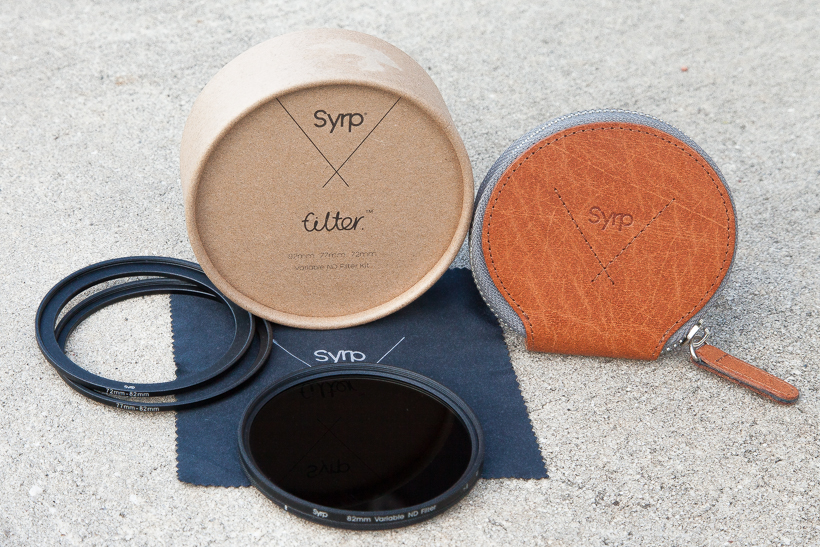
The Syrp Variable ND Filter: everything in the box
Color & Sharpness
I was impressed with the filter’s optical performance. The Syrp Variable ND shows a consistent, and well-controlled, green color shift. I was expecting a lot more variance out of a filter at this price range, but it wasn’t there. Also, the shift is consistent across the rotation range and is easily correctable in Camera Raw or Lightrooom (i.e. you don’t get a blue shift on one end, and a green shift on the other). This is a big deal, because the last thing you want to do is color-correct for every little turn of the filter you might have made during your photo session. I also didn’t see much vingetting; that was a real surprise.
The image does get a bit softer at 8.5 stops than without the filter, but it is usable.
Take a look a the series of images below comparing an image taken with no filter vs images taken with the Syrp variable ND filter at various stops. Drag the slider to see more of either image. The last image you see in the series is a color-corrected image taken with the Syrp filter at 8.5 stops. Note: all the images were taken on a tripod within a few seconds of one another.
No Filter vs Syrp Variable ND at 1 stop
[twentytwenty]


[/twentytwenty]
No Filter vs Syrp Variable ND at 3 stops
[twentytwenty]

[/twentytwenty]
No Filter vs Syrp Variable ND at 5 stops
[twentytwenty]

[/twentytwenty]
No Filter vs Syrp Variable ND at 8.5 stops
[twentytwenty]
 [/twentytwenty]
Image taken with the Syrp Variable ND at 8.5 stops – quick and dirty color correction in Lightroom.

Using It
The stops are clearly defined on the filter as I, II, III, IIII, IIIII, IIIIII, IIIIIII, IIIIIIII, IIIIIIII+ (the last being 8.5 stops). I like that the stops are demarcated, but I think the single notches can be hard to read after about 5 stops. It’s not a big deal, as I was able to tell what stop I was at. But, part of me wonders if it wouldn’t have been easier to just use digits.
Also, while there’s a small indicator dot to line up the stop to, it’s not clear whether I should be aligning the first “I” or middle “I” to the indicator. It would have been great to have a dot to show me where to align for a particular stop.
The stop marks and the indicator are minor quibbles. It’s really not hard to sort out what stop you’re at. Besides, what you’re really looking for when using an ND filter is a target shutter speed. You’re just spinning the filter until you get to your desired shutter speed. Do you really need to line up an indicator to a dot? No, you don’t.
I did have a bit of stickiness with the step-up ring to my Canon 77mm lenses. However, I never had to use a filter wrench to remove the filter. The filter motion is smooth.
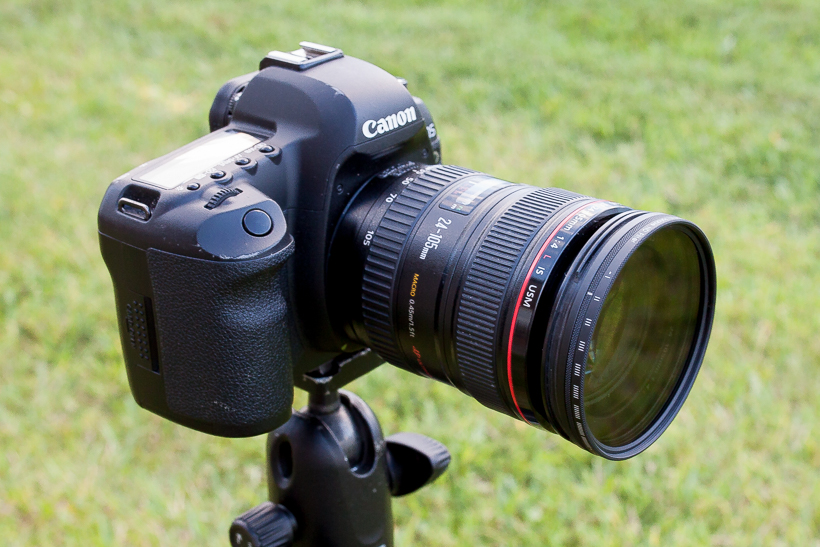
The filter mounted on my battle-scarred 24-105f/4L
Should you buy it
Some minor notes on numerals and stop indicators aside, the Syrp Variable ND filter is a strong performer. It shows a consistent, well-controlled, and manageable color shift across the rotation range while still yielding a sharp image. That’s a lot to pack into a sub- $200 variable ND.
At $139 for the small and $189 for the large filter, the price is well below comparable filters from B+W and Singh Ray (where you’ll be spending $300 and up). All-in-all, you get good optical performance at a decent price. Besides, you’ll really want that filter case!
Where to buy
B&H: Syrp ND Filter – Small
B&H: Syrp ND Filter – Large
© Copyright Ali Elhajj 2014-2020


